Hello,
I have been using the “Eraser” program on my laptop with Windows 10 for quite some time.
Due to technical problems, I used the Windows recovery option. Since this deletes all programs and apps, I had to reinstall the programs I use – including “Eraser.”
After the recovery, I installed the build “Eraser 6.2.0.2996”.
No problems occurred during installation. However, I encountered the following problems during use:
- Although the checkbox is checked for "Integrate Eraser into Windows Explorer" I cannot get Eraser to appear in the pull-down context menu for any folder or file.
- When selecting a file or a folder for safe deletion nothing will happened. And I have no chance or possibility to stop or delete task – neither when I exit the program nor when I uninstall and then reinstall it. In both cases after the start of the program the task is still running without something is visible on the bar with the status and I am not able to stop or delete the task.
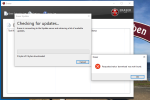
- When I choose „Check for Updates“ I get an error message „Requested value ‘download‘ was not found.“ (see attached picture).
Due to the problems mentioned before I have uninstalled the version and then installed build „Eraser 6.2.0.2996“. But I got (and get ….) the same problems.
It would happy if somebody could support what to do to solve the problems.
Many thanks in advance!
Regards
G_Joe
I have been using the “Eraser” program on my laptop with Windows 10 for quite some time.
Due to technical problems, I used the Windows recovery option. Since this deletes all programs and apps, I had to reinstall the programs I use – including “Eraser.”
After the recovery, I installed the build “Eraser 6.2.0.2996”.
No problems occurred during installation. However, I encountered the following problems during use:
- Although the checkbox is checked for "Integrate Eraser into Windows Explorer" I cannot get Eraser to appear in the pull-down context menu for any folder or file.
- When selecting a file or a folder for safe deletion nothing will happened. And I have no chance or possibility to stop or delete task – neither when I exit the program nor when I uninstall and then reinstall it. In both cases after the start of the program the task is still running without something is visible on the bar with the status and I am not able to stop or delete the task.
- When I choose „Check for Updates“ I get an error message „Requested value ‘download‘ was not found.“ (see attached picture).
Due to the problems mentioned before I have uninstalled the version and then installed build „Eraser 6.2.0.2996“. But I got (and get ….) the same problems.
It would happy if somebody could support what to do to solve the problems.
Many thanks in advance!
Regards
G_Joe